


Compatible Devices & Connectivity
Connectivity
A strong school Wi-Fi connection helps ensure DOTS runs more effectively on student devices. It’s important to make sure your school’s internet connection is reliable enough to support testing, particularly if multiple groups of pupils will be testing at the same time in different areas of the building. This can put above average strain on the connection and contribute to buffering.
The Wi-Fi should be purpose-fit for schools as it must be capable of hosting a significant number of devices. If you believe that your Wi-Fi signal may not be equipped to handle the number of required devices, Oide provides a school-specific guide to acquiring Wi-Fi tailored for the demands of the Irish educational environment. The document can be accessed on the webpage here: “Oide WiFi Network Guide 2025“.
In order to test connectivity, we recommend searching for an internet speed test on Google while in the school building, like https://www.speedtest.net, to see how your device performs. Keep in mind that the result might be lower when all student devices are using the internet simultaneously as they would during testing.
If your Wi-Fi has a weak signal or struggles to connect a large number of student devices, consider boosting your Wi-Fi signal or carefully scheduling your testing windows to ensure that very few students are taking online tests at any given time to reduce strain on the connection. Alternatively, if some rooms have stronger signals than others in the building, consider trying to acquire Wi-Fi signal extenders to reach areas with weak signal. If this is not possible, arranging that testing occur in strong signal areas only is advised.


Devices
The Drumcondra online tests can run on a variety of devices, from laptops and desktops to tablets and iPads. However, older versions of these devices may not be capable of optimally displaying the tests and it is crucial to ensure DOTS compatibility with your hardware in advance to avoid delays in testing.
Generally, devices that are still receiving software updates can run the Drumcondra Online Tests. Each manufacturer may have a different policy regarding when they cease updating a piece of hardware.
For Chromebooks, devices are eligible to receive updates for 10 years: You can find a complete update schedule here.
Apple does not give a specific time frame for update eligibility, but a list of iPad devices compatible with the most recent software can be found here. The iPad timeout function may interrupt the timing of online tests if the device times out during a session. We strongly recommend disabling this function when using iPads for testing. Instructions on how to do this can be found here.
For laptops, devices that run Windows 10/11 are compatible with DOTS.
It is also important to consider the ratio of students to devices. If there is an available device with adequate hardware to accommodate each student, then your school is prepared in this category. If there are more students than devices, then careful scheduling of testing windows is necessary to allow all students to take the tests.
Platform Compatibility
Save time and reduce stress during testing by checking in advance that each student device can run the test without problems. To help with this, make sure all devices and browsers are updated with the latest software. The guide below provides more information on how to do this.
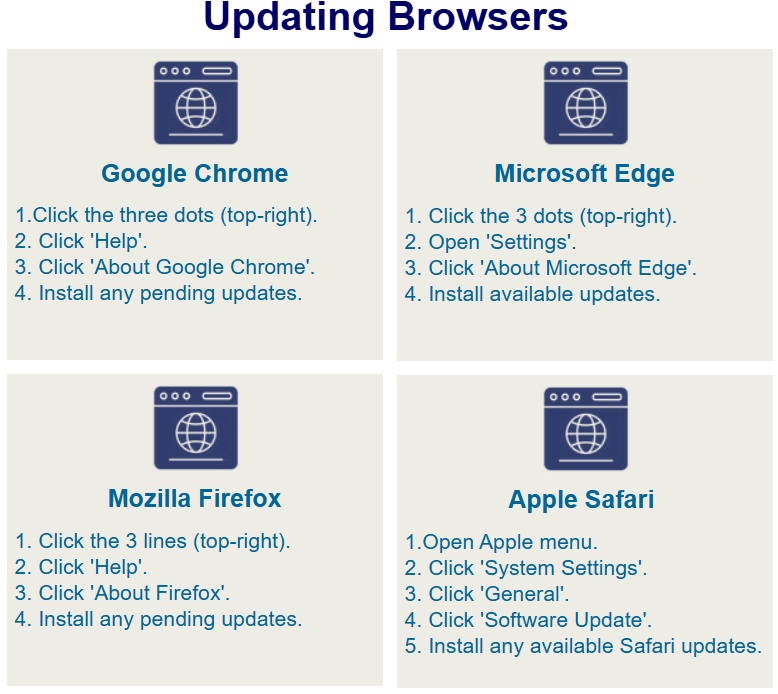
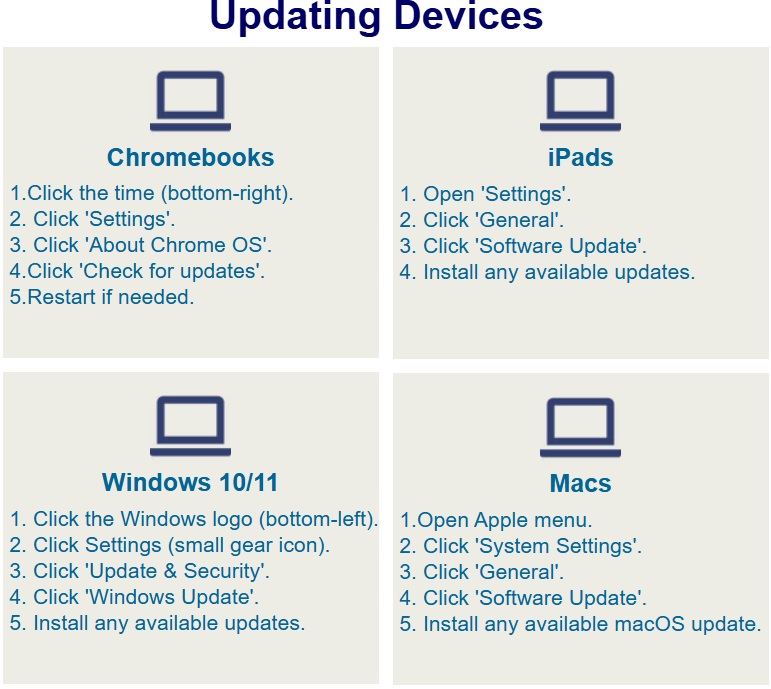
After updating student devices to the most recent browser and operating system versions in line with the guide above, navigate to https://takethetest.erc.ie/ERC/Index#/testpage. This will allow you to test whether the device is able to properly run and display the test. Make certain to check this on each device in advance of the testing window. We also recommend bookmarking this page on each device will allow you to quickly check in future years. If you experience any issues, please see our “DOTS Troubleshooting & FAQ“ page and considering contacting your school’s IT support staff if available.

Technical Support
Having someone familiar with your school’s technical setup available during online testing is a valuable precaution. This person can help with Wi-Fi checks, device setup, and software updates, and is best positioned to address unexpected issues such as outages or other technical hiccups. Since DOTS may occasionally interact with school-level settings (e.g., firewall, Wi-Fi, or cookies), consulting with them beforehand can help prevent problems. If their availability is limited, it’s a good idea to schedule test sessions around times when support can be provided if needed.
Technical support is also available through the ERC website via our Troubleshooting FAQs and DOTS Service Tracker . To help us diagnose any issues, we may ask for device information, which can be easily accessed through our test page here. We recommend bookmarking this page on each device so it’s readily available if you need urgent assistance.